
The basic promise of vibe coding sounds simple: describe what you want, and AI writes the code. But one question remained: Can it really work well from a plain-language request?
When I finally sat down to try it, coding was not the biggest obstacle. Deciding what to build was. AI can generate code, but it does not automatically give an idea its purpose or direction. Even now, the first question I ask before starting something new is: What should I build?
In this article
Is vibe coding the same as no-code?
The term vibe coding became widely known after a February 2025 post by Andrej Karpathy. The approach he described was less about carefully reading every line of code and more about repeatedly telling AI what result you wanted, feeding errors back to it, and continuing until the program worked. The meaning has broadened somewhat since then. Cambridge Dictionary and Merriam-Webster now include the wider practice of using natural-language instructions to have AI generate code.
That leaves me wondering: is vibe coding just another name for no-code? Both can let someone build without typing code directly, but the process is different. No-code tools usually ask the user to assemble predefined menus, blocks, and components. With vibe coding, the user describes the desired result and AI generates the code behind it.
Here is how I’ve come to understand it:
Ideally, it is a tool that helps turn an idea into reality. More practically, it is a tool that helps you do what you want to do.
A 30-minute app experiment that started with a prompt
The goal was to see whether a beginner could use natural language to build a small app that was useful in everyday life. This was the core of my first request:
Build a responsive to-do web app that a beginner can use without writing code. It should support adding, completing, and deleting tasks, preserve them after a refresh, and send each task to a prefilled Google Calendar event page.
Codex, OpenAI’s coding agent running in the desktop app, then began creating a web app that stored tasks and opened them in a new Google Calendar event page.
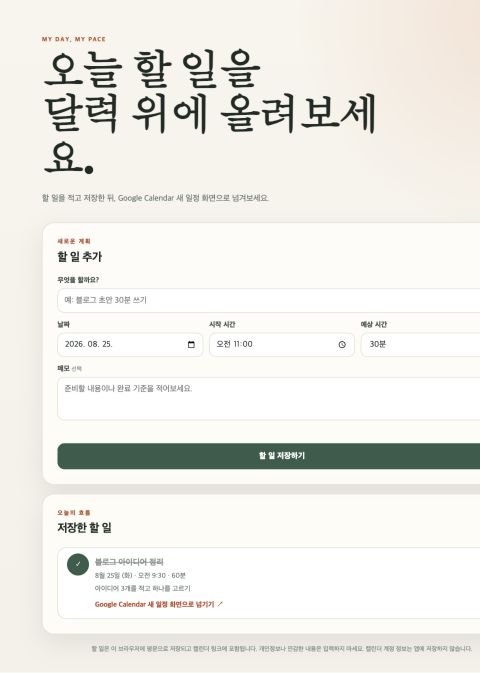
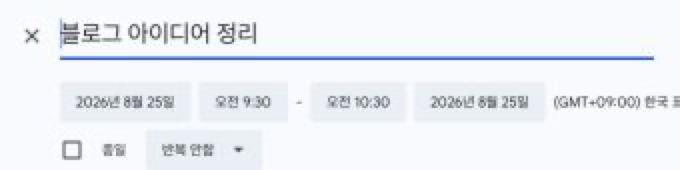
I added the Calendar feature because I wanted to test something more useful than a basic add-and-delete demo. The app was implemented to include a task’s title, date, time, and notes in a Calendar link. The live Calendar check confirmed that the title and time slot were filled in. It stopped there: the user still had to click the final Save button. The Google Calendar API can create events automatically, but that requires Google account authentication and permission to write to a calendar. For this experiment, I chose the lower-permission approach that a beginner could try within the 30-minute limit.
The 30 minutes included defining the request, implementation, setup, execution, corrections, and browser checks. There was an important head start: Codex, Python, and Node.js were already available on the Mac used for the test. The experiment used an existing ChatGPT Pro/Codex subscription, with no additional purchase or public deployment and only synthetic task data.
A visible interface was not enough to count as success. The app needed to add, complete, and delete tasks; preserve data after a refresh; reject an empty title; work at a mobile width; and pass task details to Google Calendar.
A working screen is not the same as a verified app
About six minutes after the first request, a to-do app that had not existed moments earlier appeared in the browser. I could add a task, mark it complete, and refresh the page without losing the data. Submitting an empty task produced a message asking for a title. When the task was sent to Calendar, a new event page opened with the title and a 9:30–10:30 time slot already filled in. I stopped before the final Save step so the test would not leave an unnecessary event in the account.
Codex also created and ran eight automated tests—software checks that Codex itself wrote and ran—covering input handling, storage, completion, deletion, and Calendar time calculations. All eight passed.
The roughly six-minute result refers to the initial implementation and first checks on August 25, 2026. A later review led to improvements to time-zone handling and privacy notices, followed by another successful run of all eight tests. That later review and revision time is not included in the six-minute figure.
There was still an important limitation: the same AI created both the app and its automated tests. A passing test suite does not prove that every feature works in every situation. The deletion logic passed a code-level test, but I did not click the Delete button in the live browser. The mobile check only confirmed that the layout did not overflow at a width of 390 pixels. It did not cover a real phone, a virtual keyboard, or touch usability.
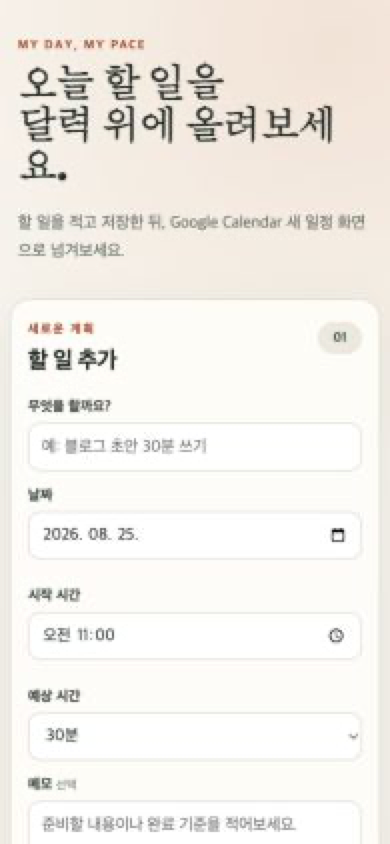
The app stored task text in the browser and included it in the Calendar link, so I used only synthetic data. Anyone recreating this experiment should avoid sensitive task titles or notes.
The six-minute result should not be read as a promise that anyone can reproduce it in six minutes. Someone starting without the required tools already installed may need considerably more time and troubleshooting.
The first success that matters to a beginner
For someone building an app for the first time, the most meaningful moment may not be perfect visual design. It may simply be seeing the app respond as I asked. In this experiment, that moment came when the task appeared in the prefilled Calendar event page. If the first attempt hadn’t gone as hoped, it would have been easy to conclude the technology wasn’t there yet. That is why I wanted to show both what worked and what remained unverified.
This experiment did not show that vibe coding magically completes an idea. A person still has to decide what to build and what should count as success. But AI was able to handle not only the code generation, but also running the app and executing tests. The path from a small idea to a working screen was shorter than I expected.
If this article leaves you thinking, I want to try that once, it has done enough. If choosing an idea feels overwhelming, do not start with a grand service. Start with one task you repeat today.
AI was used to assist with research and drafting. The author independently verified and edited the final article.


답글 남기기